
Credit cards
A credit card isn’t like your other accounts: its balance isn’t your money, it’s credit you can spend and pay back later.
Adding a card
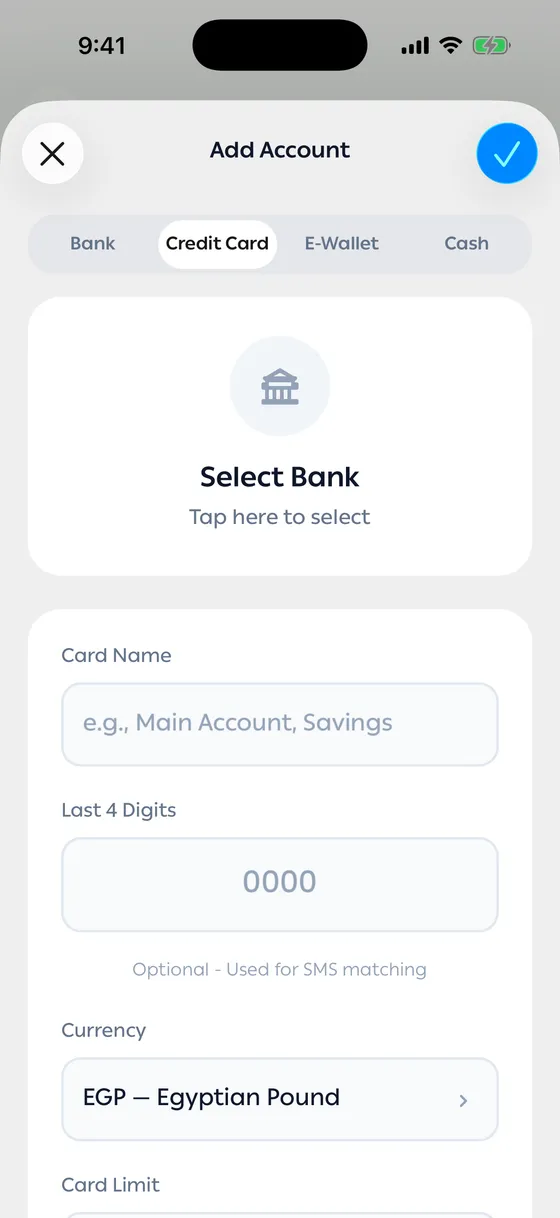
Section titled “Adding a card”- On the add-account screen, choose the Credit Card tab.
- Pick the bank and give the card a Card Name.
- Enter the Card Limit — the most the card allows.
- Enter the Available Balance you have left, or the Outstanding Balance you owe.
- Add the last four digits so the card’s messages find their way.
The numbers you’ll see
Section titled “The numbers you’ll see”| Number | What it means |
|---|---|
| Card Limit | The most the card allows |
| Available Balance | What you can still spend |
| Outstanding Balance | What you owe and will pay back |
| Estimated minimum payment | The least you have to pay this month |
The app estimates the minimum as 5% of what’s outstanding. If your statement says something else, enter it under Statement minimum payment and the app uses your figure instead.
Payment reminders
Section titled “Payment reminders”On the card screen, turn on Payment reminder, set the Payment due date — a day each month — and how many days ahead you want to hear from us.
In months without that day, the last day of the month is used.
Marking a payment
Section titled “Marking a payment”When you’ve paid, tap Mark as paid. That clears this month’s obligation only; it doesn’t change the card’s balance, which updates from the payment transaction itself.
- Set the reminder at least two days ahead if you pay from another bank.
- If your card sends messages, add its last four digits — without them the transactions land somewhere else.
Common problems
Section titled “Common problems”The minimum doesn’t match my statement — that’s the app’s estimate. Enter your statement’s figure and it takes over.
My card’s balance is reducing my total — Include in net worth is on. Turn it off when you edit the account.