
Your portfolio
Limited on the free planNot all of your money is in a bank. There’s gold at home, shares, silver, an apartment, a car. Your portfolio brings them together and tells you what they’re worth today, not on the day you bought them.
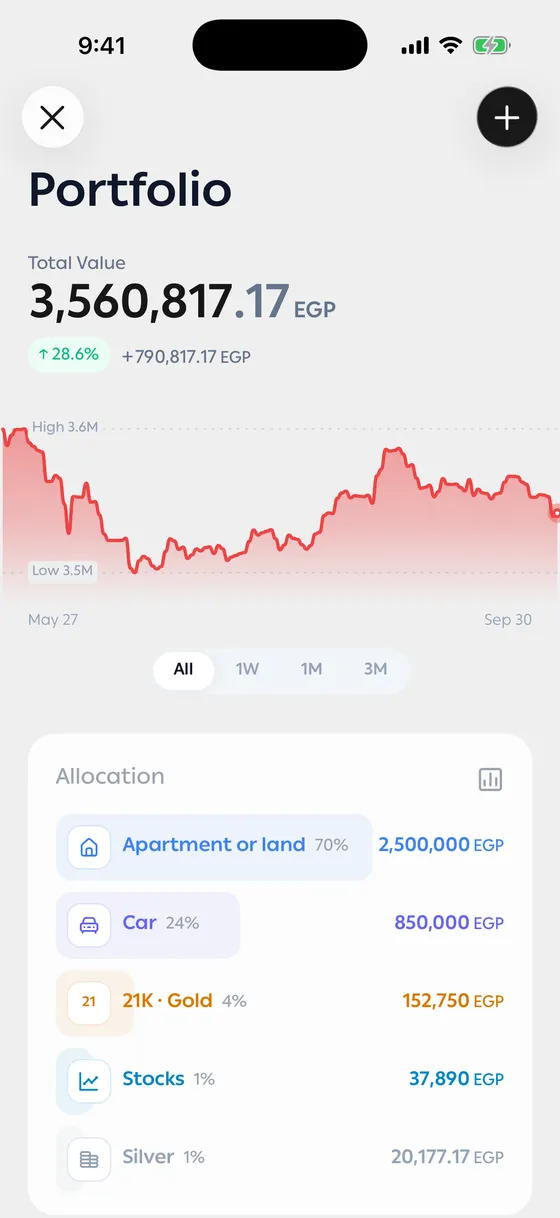
What you see
Section titled “What you see”- Total Value — everything you hold at today’s prices.
- Total Gain/Loss — the difference between what you paid and what it’s worth now.
- Allocation — what share of your portfolio each type is.
- Assets — each holding with its value and its share, grouped by kind with the biggest value first.
Underneath, Prices updated shows when they last came in.
The asset screen
Section titled “The asset screen”Tap any asset for its details: the current price, the quantity, what you paid, the gain or loss, and a chart of the price over different ranges.
Prices
Section titled “Prices”Gold, silver and stock prices update themselves from the market. All you enter is the quantity and what you paid.
Apartments, cars, businesses and anything else you own take the value you record instead. See Apartments, cars and other assets.
Counting toward your net worth
Section titled “Counting toward your net worth”Each asset has Include in net worth. Turn it off for anything that shouldn’t count in your totals, like gold you’re holding for someone else.
- Enter the real purchase price. Without it, gain and loss mean nothing.
- Gold is recorded by weight and karat — check the karat, it changes the value.
Common problems
Section titled “Common problems”The price isn’t updating — prices come from the market and are sometimes delayed. If it drags on, check your connection.
The value isn’t what I expected — check the quantity, the karat and the purchase price on the asset screen.