
Reporting a wrong transaction
The app reads your bank’s messages to work out each transaction. Sometimes it reads one wrong — an amount that’s off, an odd merchant name, a category that makes no sense.
You can fix the transaction yourself at any time. Reporting is the extra step: it sends us the message itself so we can improve how it’s read for everyone.
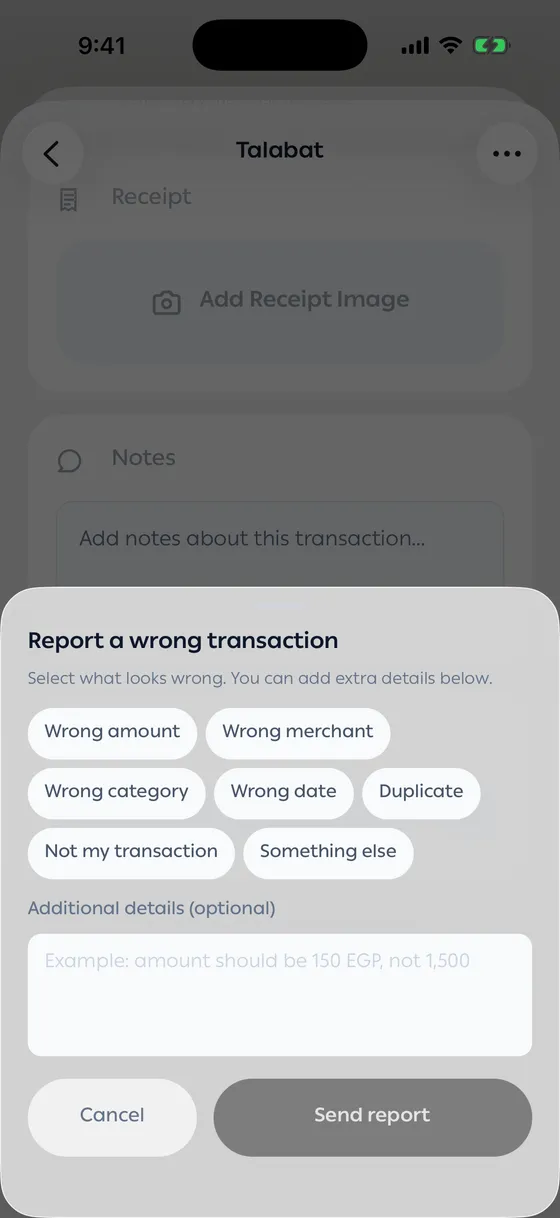
How to report
Section titled “How to report”- Open the transaction.
- Scroll to the bottom and tap Report a wrong transaction.
- Choose what looks wrong. You can pick more than one.
- Add details if you like — the right amount, for instance.
- Tap Send report.
The transaction is then marked Reported.
The reasons
Section titled “The reasons”Wrong amount · Wrong merchant · Wrong category · Wrong date · Duplicate · Not my transaction · Something else
- Put the correct value in the details box. One line — “should be 150, not 1,500” — makes a real difference.
- If the same merchant comes out wrong every time, one report is enough.
Common problems
Section titled “Common problems”I reported it and nothing changed — that’s expected. Edit it yourself; the report improves future readings.
The report didn’t send — check your connection and try again.