
Preferences
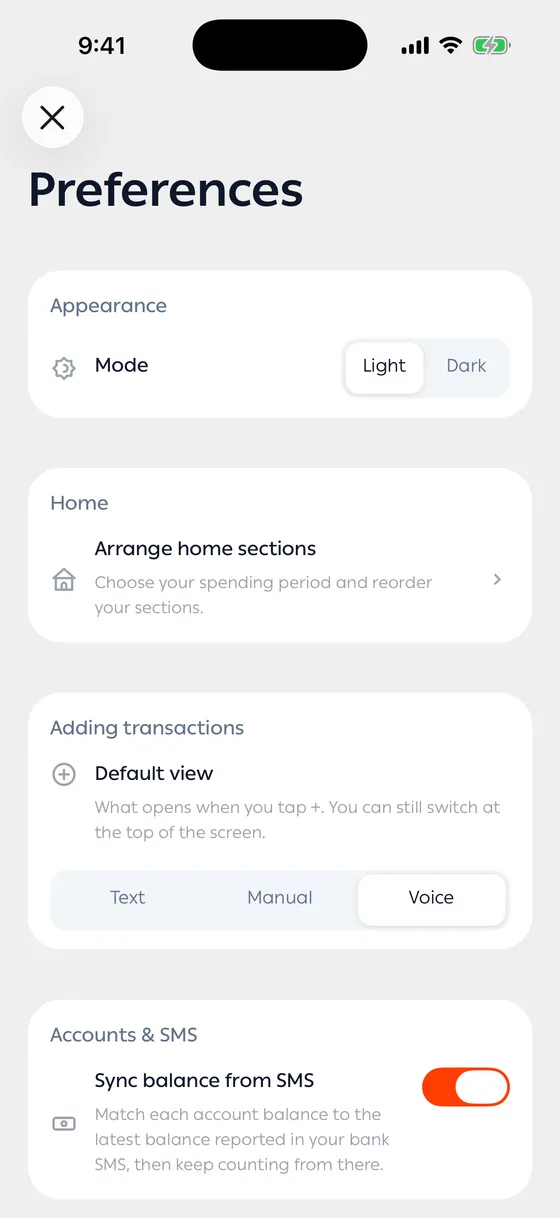
Under Account → Preferences. Four groups on one screen.
Appearance
Section titled “Appearance”A Light or Dark choice, and next to it Arrange home sections, which takes you to your home layout. The details are in Language, appearance and currency and Arranging your home screen.
Adding transactions
Section titled “Adding transactions”Default view — what opens when you tap +: Text, Manual, or Voice. You can still switch at the top of the screen; this only decides what comes up first.
Pick what you use most. If you type most of the time, make Text the default and you save a tap on every transaction.
Accounts & SMS
Section titled “Accounts & SMS”Sync balance from SMS — matches each account balance to the latest balance your bank reported in a message, then keeps counting from there.
- Start with the defaults, and change one thing only when you catch yourself doing it by hand every time.
Common problems
Section titled “Common problems”A change didn’t save — saving needs a connection. Try again.
Balances are still wrong — see Correcting a balance.