
Invite friends
Under Account → Invite friends. You have your own code, and everyone who uses it brings you closer to a free Premium month.
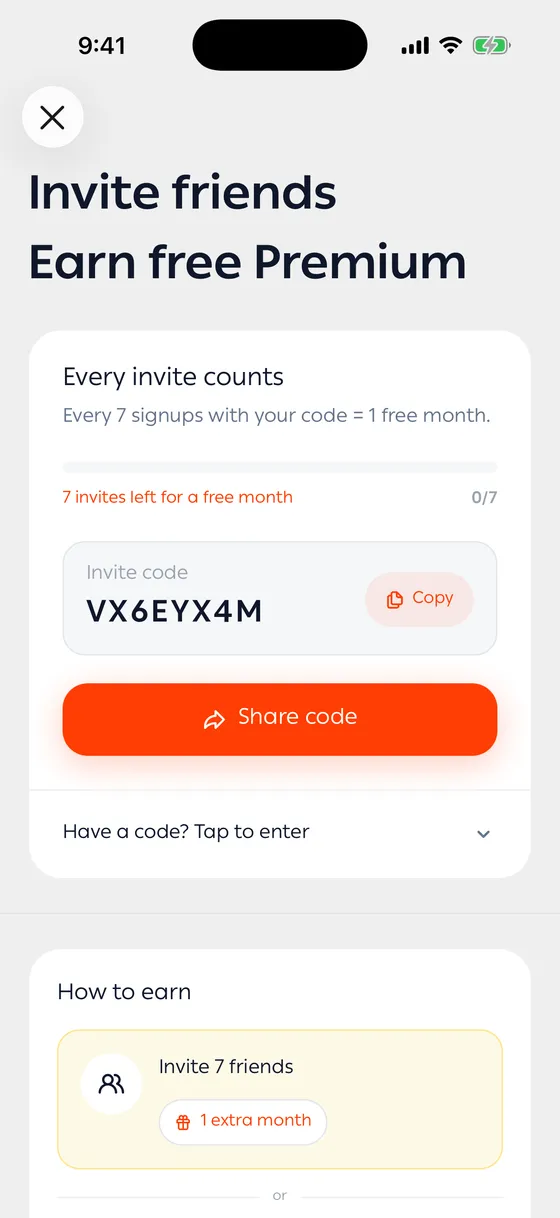
How you earn
Section titled “How you earn”Two ways:
- Signups — people who installed the app and registered with your code.
- Subscribers — people who came in with your code and then subscribed to Premium.
How many each way takes is written under How to earn inside the screen, because it changes from time to time. Trust the number in front of you there.
Sharing your code
Section titled “Sharing your code”- Open the invite screen.
- Tap Copy for the code, or Share to send it straight away.
- Your friend enters it while creating their account.
Following your progress
Section titled “Following your progress”Your progress shows how many invites you have left before the next month. Your stats holds your invites, the free months you earned, and your subscribers.
Using someone else’s code
Section titled “Using someone else’s code”Enter invite code is where you type a friend’s code.
- Send it to people who genuinely want to get on top of their money. A signup that turns into a subscription earns you faster.
Common problems
Section titled “Common problems”The code isn’t accepted — each account enters a code once. If you’ve entered one before, a second won’t go through.
My friend signed up and the count didn’t move — they need to enter the code while creating their account, not afterwards.