
Linking duplicate accounts
Banks sometimes send messages under different numbers for the same account — the card number in one, the account number in another. The app sees two accounts, so your balance and transactions get split between them.
Linking puts them under one account, without losing a single transaction.
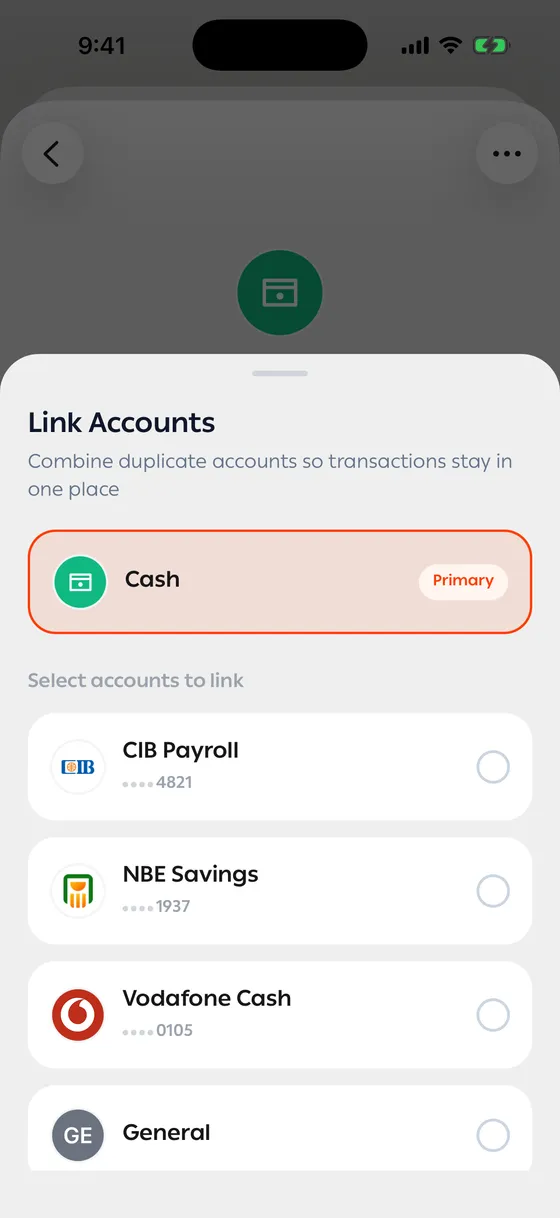
How to link
Section titled “How to link”- Open the account you want to keep as the main one.
- Tap Link Accounts.
- The Suggestions tab shows accounts with similar ending numbers. Or switch to Manual and pick them yourself.
- Check that the Primary account is the right one — everything gets combined under it.
- Choose the account or accounts to link to it.
- Confirm.
Afterwards the account screen has a Merged Accounts section listing the numbers that now feed into it.
Undoing a link
Section titled “Undoing a link”In that same section, tap Unmerge next to the number you want back. The account returns with its transactions, and the app offers to open it for you.
- Make the older account — or the one with more transactions — the primary one, so names and logos stay right.
- After linking, check the last four digits on the primary account so incoming messages find their way.
Common problems
Section titled “Common problems”There are no suggestions — suggestions only appear when ending numbers look alike. Use the Manual tab.
I linked the wrong account — open the primary account and tap Unmerge next to it.