
Keeping track of subscriptions
Limited on the free planSubscriptions slip past unnoticed. Each one is small on its own; together they aren’t.
The Subscriptions tab
Section titled “The Subscriptions tab”On the Recurring Payments screen, the Subscriptions tab shows only what renews — no installments, no loans.
At the top is your Monthly subscription total: everything worked out on a monthly basis, yearly plans included, so the figures are comparable.
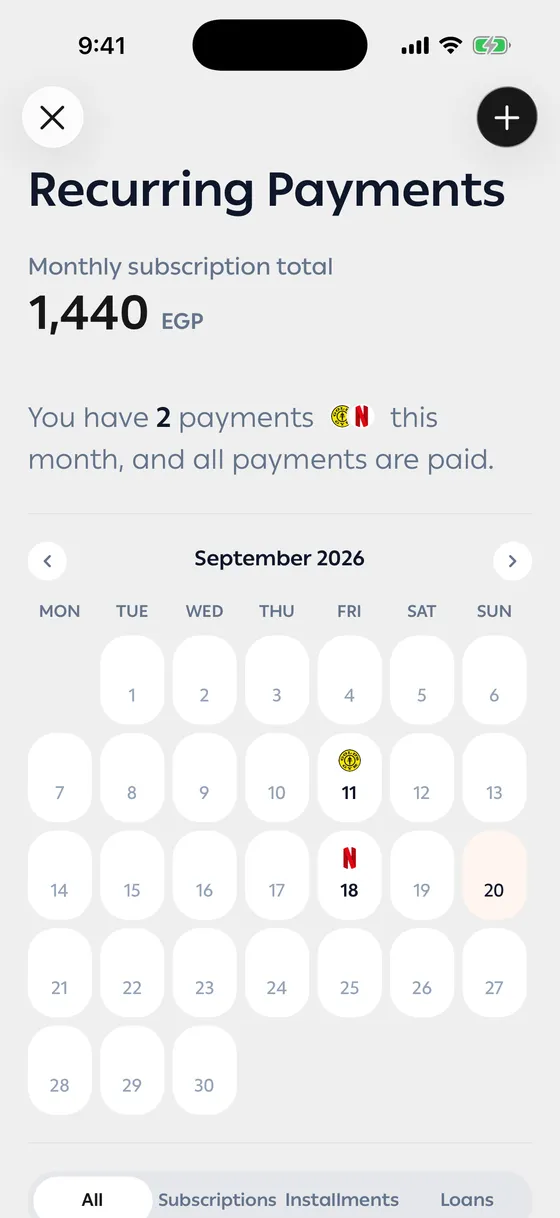
The calendar
Section titled “The calendar”The screen marks the days payments fall due and lets you move between months. That’s how you see a heavy week before it arrives.
Finished and cancelled
Section titled “Finished and cancelled”Subscriptions you’ve stopped move to Completed & cancelled, so they stay in your record without crowding the list.
- Look at the monthly total every couple of months. That’s the number that opens eyes.
- Enter yearly plans on their yearly cycle, not a monthly one — the app divides them correctly for the total.
- Before cancelling, look at the subscription’s transactions and see how much you actually used it.
Common problems
Section titled “Common problems”The total is higher than I expected — a yearly plan is in there, divided across the months. Open it and see.
A subscription I cancelled keeps renewing — cancel it where you bought it too; the app follows subscriptions, it doesn’t cancel them.