
Linking a debt to a transaction
Limited on the free planWhen someone pays you back, a real transaction happened — a transfer that arrived, or cash that came in. Linking the debt to it keeps your record straight: you know when each payment came, and by exactly what.
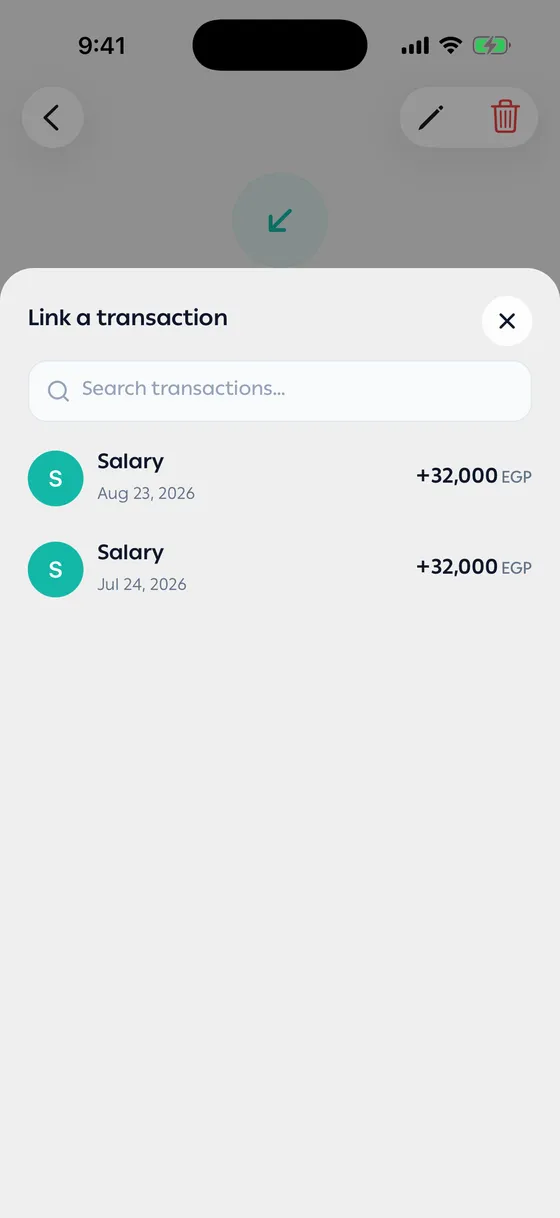
Linking
Section titled “Linking”- Open the debt and tap Pay.
- Tap Link a transaction.
- Pick it from the list — your recent transactions are shown so it’s quick to find.
The transaction is added under Payments on the debt as a Linked transaction, and you can open it from there. If it covers what’s left, the debt is settled. If it’s less or more than what’s left, the app asks whether it’s a partial payment, a full one, or one with extra — see When the amount doesn’t match.
Without a link
Section titled “Without a link”If there’s no transaction — they paid you in cash and you didn’t record it — tap Pay, then Pay it all or Pay part of it. The payment is labelled Recorded by you.
Unlinking
Section titled “Unlinking”Delete the linked payment from Payments on the debt. Its amount goes back onto the debt, and the transaction itself stays untouched.
- Record the cash that comes back first, then link it. That way your balance and your record agree.
- If a debt is repaid in instalments, link each instalment as it arrives. The debt shows what’s left and settles with the last one.
Common problems
Section titled “Common problems”I can’t find the transaction in the list — it hasn’t been recorded yet. Add it first.
I recorded a payment and my balance didn’t change — that’s expected. The balance moves with the transaction, not with the payment on the debt.