
Following a split
Once the link is out, the split screen keeps you up to date: what each person owes, and who has paid.
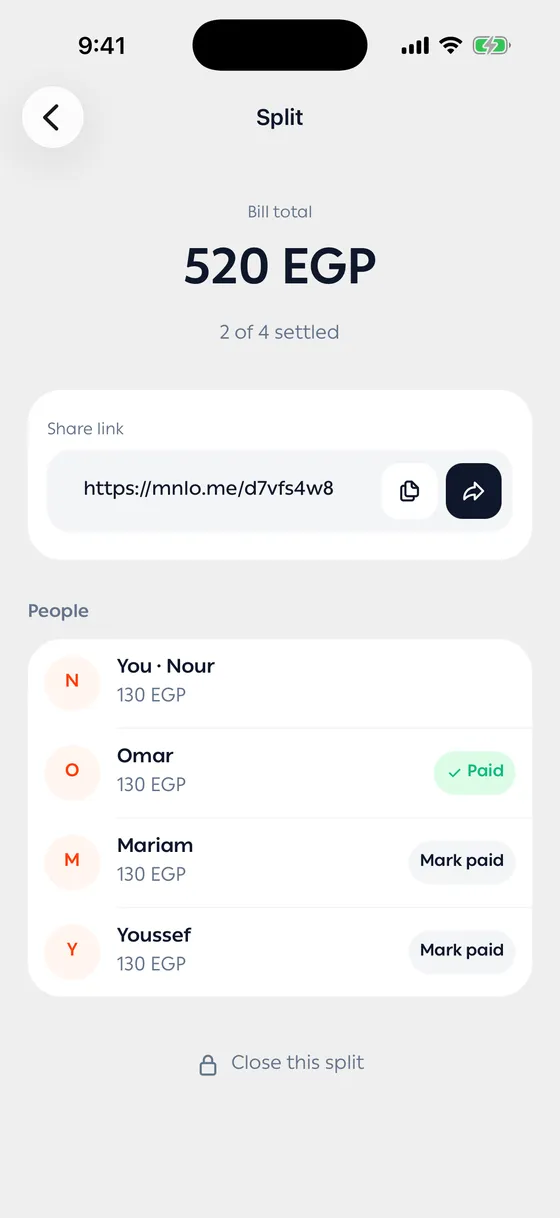
Getting there
Section titled “Getting there”- From your My splits list.
- Or open the transaction you split and tap Track split — it carries a card showing how much has been collected.
Payment states
Section titled “Payment states”| State | What it means |
|---|---|
| Not paid yet | Nothing has come in |
| Says they paid | They marked the link as sent, and you haven’t confirmed |
| Payment confirmed | You’ve confirmed receiving it |
Confirming
Section titled “Confirming”When someone’s share arrives, tap Mark paid next to their name. Tap again to undo if you did it too soon.
Closing a split
Section titled “Closing a split”When everyone has paid, tap Close this split. You can reopen it any time if something turns out to be missing.
- Confirm as the money arrives. Confirming later is how people get forgotten.
- Send the link to the group chat rather than to each person separately.
Common problems
Section titled “Common problems”Someone says they paid and I don’t see it — check your account first, and leave their state as it is until you do.
The link doesn’t work — the split was closed or deleted. Reopen it or make a new one.